
Secondary Room Streaming Setup: A Practical Family Guide
October 26, 2026 · 15 min read
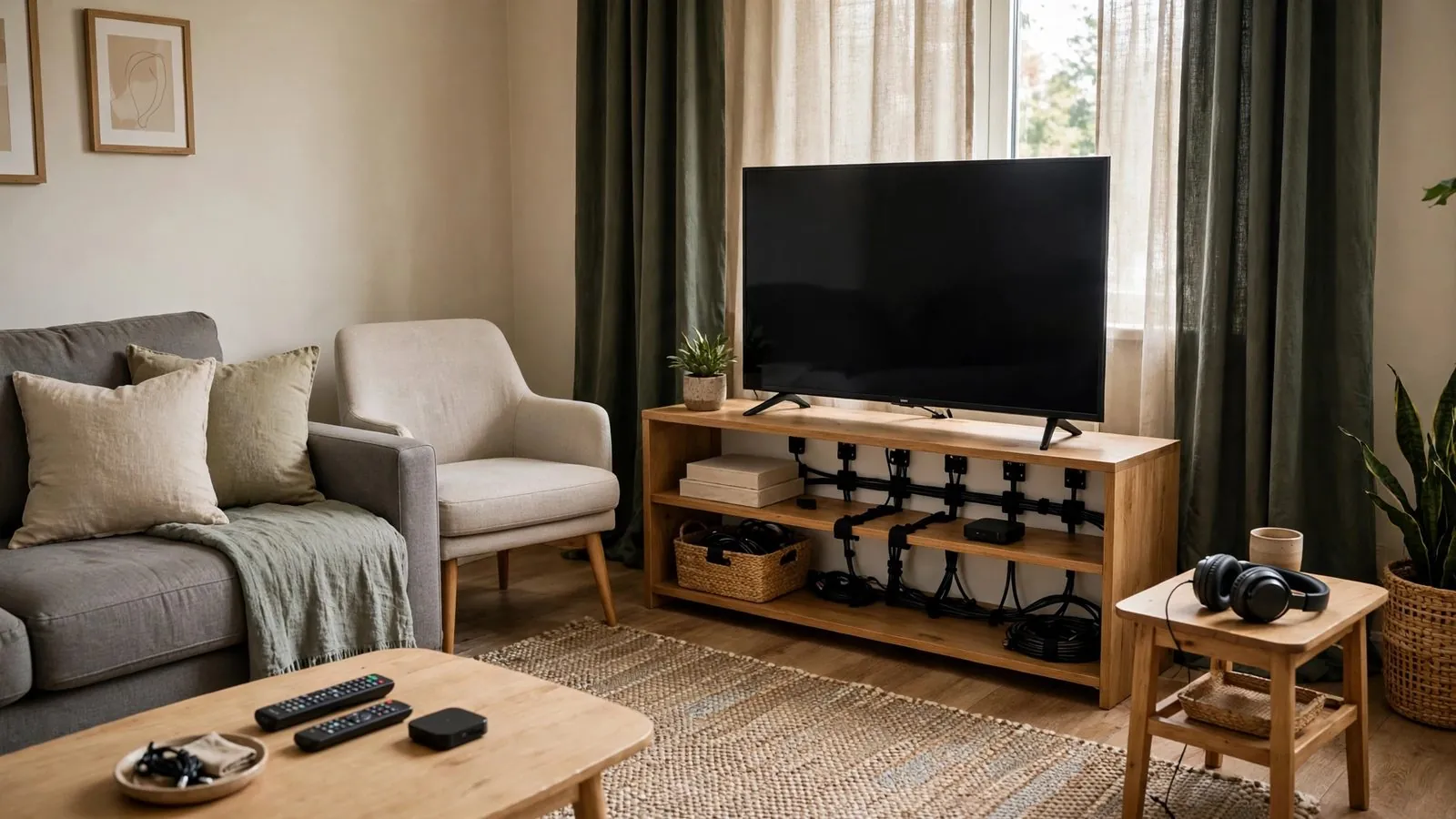
In a busy household, the central living room television often becomes a focal point of conflicting schedules and differing tastes. Between children watching after-school shows, teenagers pursuing hobbies, and adults unwinding with evening programming, a single shared display can generate daily friction. Establishing a secondary streaming space—whether located in a guest room, a corner of a home office, or a finished basement nook—provides an effective domestic release valve. Successful execution requires deliberate spatial planning, sound management, safe electrical routing, and ergonomic positioning suited to multipurpose rooms. By prioritizing physical organization and practical routines, families can build a comfortable, clutter-free retreat that complements everyday life.
Selecting the Right Space: Balancing Privacy, Utility, and Foot Traffic
The first step in planning a secondary viewing corner is assessing how household traffic intersects with the room's primary role. In most homes, secondary rooms serve multiple functions: a guest room hosts occasional visitors, a home office supports professional concentration, and a basement area may double as a playroom or laundry staging zone.
Audit daily movement patterns before committing to an arrangement. Placing an entertainment corner directly opposite high-traffic zones like kitchens or busy entryways exposes viewers to constant interruptions. Conversely, mounting a display on a wall shared with a nursery or early sleeper's bedroom restricts evening utility due to necessary volume limits.
Room dimensions dictate furniture capacity. Compact spare rooms benefit from layouts that maintain clear walking paths, utilizing wall-mounted displays and floating consoles. Ensure the chosen location provides direct access to grounded outlets without running cords across doorways or closet paths. Checking door swings, window positions, and heating vents beforehand prevents difficult furniture rearrangement later.
Ergonomics and Sightlines: Screen Mounting and Seating Heights
Ergonomics in secondary viewing rooms are frequently neglected because furniture is repurposed rather than chosen specifically for television viewing. Watching a display mounted at an awkward height from an office task chair or guest bed can quickly lead to an uncomfortable posture during extended viewing.
As a general starting point, aim for a screen height that allows a comfortable, relaxed sightline from the primary seating position without forcing your head back or forward. In an office setting, an upright seat generally pairs best with a roughly level sightline. In a bedroom or den where seating is semi-reclined, a slightly higher display with a downward tilt can feel more natural, though the most comfortable position depends on individual preference and room layout.
Viewing distance should match the room's proportions and screen size. In compact rooms, an oversized screen can feel overwhelming and make it tiring to scan the entire display. Conversely, an undersized monitor across a deep room makes navigation menus and subtitles difficult to read comfortably.
Follow the mounting bracket and display manufacturer instructions closely to determine compatible wall structures, load limits, and approved fasteners. Mounting requirements differ significantly across timber studs, masonry, and other wall constructions. Never rely on unrated drywall plugs for wall mounts, and consult a qualified installer or seek assistance when handling heavy or awkward displays.
Cable Safety and Concealment: Organizing Power and Peripherals
A secondary media area brings together a display, a streaming adapter, audio accessories, and multiple power supplies within a compact perimeter. Without structured cord management, this cluster quickly turns into an unsightly tangle that collects dust and creates tripping hazards for children and household pets.
Organize the power delivery foundation first. Avoid daisy-chaining light-duty household extension cords behind furniture. Instead, install a certified surge-protected power strip with integrated circuit protection. Where permitted by the manufacturer's instructions, secure the power bar using approved mounting slots along the rear of a media console or desk frame. Keeping connections elevated simplifies floor cleaning and keeps cables off walking paths.
For cords spanning the distance between a wall-mounted screen and a power source, surface-mounted cable raceways provide a tidy solution when chosen and installed according to product specifications. Ensure the raceway is rated for the specific cable types you are routing, observe local electrical guidance regarding power cord separation from low-voltage signal lines, and verify paint compatibility before coating the channel. Bundle excess cord slack using reusable hook-and-loop wraps rather than single-use ties, and label cord ends for easy identification.
Acoustic Separation: Containing Audio in a Multi-Person Household
A primary challenge when operating a secondary media space in an active home is sound leakage. Audio drifting into adjacent rooms can disturb sleeping family members, while household chatter can disrupt quiet viewing. Managing room acoustics involves mitigating both sound transmission and room reverberation.
Standard interior hollow-core doors provide minimal acoustic resistance, allowing sound to escape through thin panels and perimeter gaps. Adding weatherstripping along the jamb or a draft sweep at the threshold can help muffle sound transfer, but verify that modifications do not interfere with proper door latching, fire door compliance, or central HVAC return-air gaps under the door.
Within the room, hard surfaces like bare floors, unadorned walls, and large windows reflect sound, producing flutter echoes that degrade speech clarity. Introducing soft furnishings naturally absorbs excess sound energy. Placing an area rug on hard flooring, hanging fabric curtains, and adding upholstered seating can help soften room reflections and flutter echoes. For quiet late-night viewing, connecting compatible wireless headphones directly to the display or streaming player—where supported by device software—keeps playback contained without disturbing nearby rooms, though passive ambient isolation varies by headphone design.
Lighting and Glare Management for Flexible Viewing Hours
Secondary rooms often feature unshaded windows or harsh overhead fixtures that diminish screen contrast. Direct reflections off glass displays can wash out contrast and prompt viewers to set display brightness uncomfortably high to compensate.
Examine how daylight enters the room throughout the day. Screens should ideally sit perpendicular to windows rather than facing them directly. When a display directly opposes a sunny window, daytime viewing suffers from severe glare. Equipping windows with layered treatments—such as sheer blinds for soft daylight diffusion combined with blackout drapes—provides adaptable control over ambient light.
Watching in total darkness can make bright screen transitions feel jarring. Introducing soft ambient lighting—such as a low-output lamp placed outside the screen's reflection zone or an optional rear LED strip if approved by the display manufacturer—helps soften background contrast during evening viewing according to personal visual comfort.
Hardware Stations and Remote Control Organization
Because secondary rooms are used intermittently by different family members, misplaced remotes, uncharged accessories, and misplaced peripherals quickly create frustration. Establishing a dedicated, intuitive hardware station keeps the space organized and accessible.
Designate an explicit storage location for all control peripherals. A compact desktop organizer tray or wall-mounted magnetic holder keeps remote controls visible and consistently accessible. If the setup includes auxiliary items such as game controllers or wireless headphones, use manufacturer-approved chargers that match each device's specific power and battery requirements. Using adhesive cord clips on furniture edges keeps cables accessible and prevents connectors from dropping behind desks.
Where supported, activating HDMI Consumer Electronics Control (HDMI-CEC) can simplify operation, though available functions—such as synchronized power or volume adjustment—vary depending on device firmware and manufacturer implementation. Finally, ensure all electronics receive adequate convective airflow. Check each device manual for required clearance around ventilation grilles, avoiding enclosed or unventilated compartments that trap heat.
Family Coordination: Managing Viewing Routines and Space Sharing
A secondary streaming area works best when household expectations regarding its shared use are agreed upon in advance. Because the room frequently serves other everyday purposes, establishing simple routines helps minimize common scheduling friction.
Establish general room priorities aligned with daily schedules. In a shared home office, daytime hours belong strictly to remote work and study, reserving television viewing for evening or weekend hours. In a guest bedroom, household agreements should clarify that when visitors stay overnight, the room functions as a private guest retreat rather than an open family hub.
Encourage a basic reset routine for all users. Simple habits—returning remote controls to their tray, storing headphones, stowing blankets, and switching off displays—help keep the space ready for the next person. For homes with young children, storing remotes and controls on higher shelves helps keep sensitive equipment out of easy reach.
Room Readiness: Step-by-Step Space Preparation Checklist
Before assembling hardware and seating, walk through this systematic preparation checklist to confirm room readiness:
• Clearance and Flow Audit: Measure wall space, doorways, and walking paths to ensure furniture placement does not impede room entry or closet access.
• Electrical Outlet Inspection: Confirm the location of grounded wall outlets. Ensure power cords can reach equipment without stretching across walking areas.
• Wall Structure Verification: Identify the wall composition (such as timber framing or masonry) to confirm bracket compatibility and manufacturer-approved fastening methods before installation.
• Ergonomic Sightline Check: Sit in the planned viewing position to verify comfortable eye level and determine appropriate screen mounting height and tilt angle.
• Glare and Window Assessment: Observe window reflections at peak daylight hours to determine whether blackout curtains or angle adjustments are required.
• Acoustic and Airflow Check: Inspect door gaps to evaluate noise transfer, ensuring any added threshold or perimeter seals do not obstruct required HVAC airflow or compromise door closure.
• Cable Management Staging: Gather compatible cable raceways rated for your wiring types, reusable wraps, an approved power strip, and labels before mounting electronics.
• Peripheral Dock Setup: Position a dedicated remote organizer tray and a charging station within easy reach of the primary seating area.
Space Comparison: Evaluating Common Secondary Room Locations
Selecting the right secondary space depends on architectural characteristics and household priorities. The following qualitative table evaluates four common room options:
Room Type: Guest Bedroom · Spatial & Acoustic Advantages: High privacy; existing comfortable seating (bed or daybed); minimal daytime disruption when vacant. · Common Household Challenges: Temporarily unavailable during guest visits; bed dominates floor area; viewing requires tilted screen mounting. · Recommended Layout Strategy: Mount screen slightly elevated on a downward-tilt wall bracket; store secondary accessories in a closet tray.
Room Type: Home Office Corner · Spatial & Acoustic Advantages: Existing electrical outlets and desk infrastructure; comfortable ergonomic seating already present. · Common Household Challenges: Potential conflict between work and relaxation; office screens can distract; restricted floor space. · Recommended Layout Strategy: Establish a visual partition; position the display off-axis from the desk; rely on wireless headphones.
Room Type: Finished Basement Den · Spatial & Acoustic Advantages: Natural separation from upper living areas; minimal window glare; spacious footprint for varied seating. · Common Household Challenges: Potential dampness; cooler temperatures; concrete walls require specialized masonry fasteners or floor placement. · Recommended Layout Strategy: Use sturdy media furniture or confirm structural wall suitability and rated fasteners; add an area rug to soften reflections.
Room Type: Attic or Loft Nook · Spatial & Acoustic Advantages: Distinct separation from main household zones; cozy architectural character; low foot traffic. · Common Household Challenges: Sloped ceilings restrict vertical wall space; seasonal temperature swings; narrower stair access. · Recommended Layout Strategy: Use low-profile media credenzas or floor stands; avoid mounting screens to sloped surfaces without structural approval.
Hypothetical Scenarios: Practical Secondary Room Planning
The following two hypothetical planning scenarios illustrate how domestic spatial organization principles apply in different family living situations. All personal identifiers, network labels, and device credentials are fully masked for demonstration purposes.
Scenario A: The Dual-Purpose Home Office Quiet Corner
In a busy household with two working parents and two school-aged children, the upstairs home office was configured as an evening viewing nook to prevent living room scheduling conflicts.
• Room Layout: The room measures 3.2 meters by 2.8 meters, with a computer desk along one wall and a south-facing window opposite the entrance.
• Physical Arrangement: Rather than placing a media display on the work desk, the family mounted a 32-inch screen on an adjacent perpendicular wall using a timber-stud bracket. A comfortable upholstered armchair was placed in the opposite corner, establishing a clear visual boundary between professional work and relaxation.
• Cable and Power Routing: A surge-protected power strip was mounted behind the chair's side table. Cords traveling to the screen were enclosed within a paintable surface raceway matching the beige wall finish.
• Acoustic and Operational Privacy: To help contain sound without blocking required return-air ventilation, the homeowner checked door seals and paired a compatible wireless headset with the streaming hardware (labeled [DEVICE-ROOM-OFFICE]). Device setup and network identifiers (such as [SSID-SECURE-XXXX]) were configured in advance, with remotes resting in an organizer tray beside the chair.
Scenario B: The Convertible Basement Guest Room
A suburban family with teenagers wanted to adapt an underutilized basement guest room into a versatile weekend entertainment nook without removing the queen-sized bed used by visiting relatives.
• Room Layout: The room features finished drywall over concrete foundation walls, a low dropped ceiling, and a small awning window near the ceiling.
• Physical Arrangement: Because anchoring heavy brackets into furring strips carried structural limitations, the family positioned a solid low-profile wooden console against an interior timber partition wall. A 43-inch screen was placed on the console at a height comfortable from both the bed and a pair of floor beanbag cushions.
• Lighting and Glare Control: To block daylight from the awning window, an opaque cellular shade was installed, supplemented by a soft ambient backlight positioned behind the console.
• Hardware Management: Media peripherals (labeled [STREAM-NODE-BASEMENT]) were set on open shelving following the manufacturer's recommended ventilation clearances. Remotes were stored in an open acrylic tray on the console, and the family agreed on shared quiet hours for school nights.
Conclusion
Designing a practical secondary streaming space in a family home is fundamentally a matter of thoughtful layout planning rather than technical complexity. By selecting a location suited to household traffic, positioning screens for comfortable viewing, organizing cables safely, and softening room acoustics with everyday furnishings, families can create an enjoyable viewing space. Combined with practical household routines and tidy accessory storage, a secondary viewing corner can help reduce living room congestion and give household members an alternative space to watch their preferred programming.
Want the full Kemo IPTV experience?
Frequently asked questions
How can I stop audio in a secondary room from disturbing other family members?
Managing sound spillage involves softening interior room reflections and limiting drafts without blocking necessary airflow. Adding weatherstripping along the door jamb or a draft stopper at the threshold can help muffle hallway noise, provided it does not compromise HVAC return airflow under the door or proper door latching. Inside the room, an area rug and fabric curtains help reduce echo. For late-night viewing, connecting compatible wireless headphones directly to your display or streaming device keeps audio private without disturbing other rooms.
What is the most secure way to wall-mount a screen in a secondary room?
The safest method is following the specific installation manual provided by both the screen and bracket manufacturers. Fastening requirements depend entirely on wall composition—whether timber framing, solid masonry, or other materials—and the combined weight of the display and mount. Never rely on standard plastic drywall plugs for television mounts. If you are uncertain about wall load capacity, stud locations, or proper fastener ratings, or if you are installing a large, heavy display, consult a qualified professional installer and never attempt heavy lifting alone.
How should power and display cables be concealed without cutting into walls?
Surface-mounted cable raceways offer a neat method for routing visible wiring without cutting into drywall. Choose raceways rated for your specific cable types, follow electrical guidelines regarding the separation of power cables and low-voltage signal cords, and confirm the channel material is suitable for painting. Bundle excess cord length neatly behind furniture using reusable hook-and-loop straps. Flexible appliance power cords should never be routed through interior wall cavities, as standard cord insulation is not rated for enclosed wall spaces.
When should I choose a wall mount over a media console in a compact room?
Wall mounting is ideal when floor space is limited, as it keeps walking paths completely clear and delivers a modern, open feel. However, it requires a plan for hiding cords and placing peripheral devices. A compact media console or credenza takes up floor space but provides immediate shelf room for streaming devices, power strips, and storage bins without needing wall penetrations. In dual-purpose rooms like guest bedrooms, combining a wall-mounted display with a shallow floating wall shelf often provides the best balance of floor clearance and accessory storage.
How can I keep a secondary streaming setup looking tidy when not in use?
Maintaining visual order requires dedicated peripheral storage, concealed wiring, and simple post-viewing habits. Keep small streaming devices and accessories organized using dedicated console shelves or manufacturer-approved accessory brackets, ensuring ventilation vents remain completely unobstructed. Avoid adhering heat-generating power bricks directly to the display chassis unless specifically approved by the manufacturer. Keep remotes, charging cords, and accessories inside an opaque decorative basket or dedicated drawer. When not watching active content, setting the screen to display a quiet ambient art mode or family photo rotation turns an idle black screen into an attractive decorative element.
Read next: the pricing page or the FAQ.